

Why Your VPS Slows Down & Experiences High Latency During the New York Session Open
A universal and deeply misunderstood phenomenon in automated trading is the intra-day performance decay of virtual private servers. You run a diagnostic test at 08:00 SGT during the Asian session, and the results are pristine: ultra-responsive terminal navigation, stable CPU loads, and instant order execution. Yet, at precisely 20:30 SGT, the moment the New York session opens or a high-impact news event like NFP drops, the entire environment degrades. Orders take seconds to route, the terminal UI locks up, and slippage destroys your algorithmic edge.
This is not a MetaQuotes software bug, nor is it your broker manipulating your feed. It is a fundamental, mathematical failure of over-allocated hypervisor architecture. Here is the exact virtualization science behind why your legacy VPS provider chokes during market overlaps, and how you can diagnose CPU starvation.
1. The Asian Session Illusion vs. The New York Open Reality
The pristine performance you experience during the Asian session is an architectural illusion. During this time, global forex volume is relatively low. The tick density—the number of price updates streaming into your terminal per second—is minimal.
Consequently, the vast majority of virtual machines residing on your host server are functionally idle. This prolonged idleness conceals the extreme overbooking ratio executed by budget VPS providers. When a provider crams 120 client VMs onto a localized hardware node built for 20, they rely heavily on the statistical assumption that not all users will demand physical processing power simultaneously. The Asian session perfectly masks this vulnerability. The New York Open ruthlessly exposes it.
2. Hypervisor Scheduling Queues & CPU Ready Time (%RDY)
To understand this performance collapse, you must examine the VM hypervisor scheduler. In a virtualized environment, your vCPU (Virtual CPU) is not a physical processor; it is a time-slice of a shared physical core managed by the hypervisor.
When the New York session opens, 120 overbooked instances suddenly "wake up." Millions of ticks flood the shared network interface, and every MT4/MT5 terminal simultaneously requests processing power to parse incoming data and run complex EA logic matrices. The hypervisor’s scheduler is instantly slammed. It cannot distribute CPU cycles concurrently to 120 requesting machines.
This generates a massive spike in CPU Ready Time (%RDY). This critical virtualization metric represents the exact percentage of time your virtual machine spends in a queue, fully ready to execute an instruction, but waiting for a physical CPU core to become available.

For users paying for a "Multi-Core" VPS on an overbooked network, the problem is exponentially worse due to Co-Stop (%CSTP). In multi-vCPU setups, the hypervisor scheduler must wait until multiple physical cores are free simultaneously before it can execute your machine's threads. Under heavy NY open loads, this synchronization requirement causes catastrophic multi-millisecond stalls. Your EA is frozen in a hypervisor waiting line.
3. The "Network Ping" Illusion vs. CPU Starvation
The greatest trap for retail traders is relying on the terminal's built-in network ping indicator. At 20:30 SGT, your terminal ping to an Equinix LD4 or NY4 broker server might still read a pristine "2ms." Yet, your EA logs reveal an agonizing 1500ms delay between the trade signal and actual execution.
Why? Because network latency—the physical fiber-optic transit time from your VPS network interface to the broker—has not changed. The breakdown is entirely internal.
This is CPU Starvation resulting in local packet bottlenecking. Your EA receives the tick data, but the unallocated CPU thread is frozen. The MT4/MT5 terminal.exe process is physically unable to parse the tick, calculate the trailing stop condition, assemble the execution packet, and push it to the virtual network adapter. The bottleneck is not transit time; it is localized processing paralysis.
4. How to Run a High-Load VPS Diagnostic
Do not rely on subjective feelings of "lag." Audit your hypervisor's underlying health using strict diagnostic protocols.
- Inspect the MT4/MT5 Journal Timestamp Gap: Check your Journal or Experts tab logs immediately following a volatile NY open trade. Track the microsecond gap between the EA’s internal Tick Received/Condition Met timestamp and the broker’s Order Sent/Order Accepted timestamp. If you observe a divergence of 200ms to 2000ms+ despite a "2ms" network ping, you are being actively throttled by CPU Ready Time delays.
- Kernel DPC Latency Audits (LatencyMon): Download and run LatencyMon inside your VPS during the New York session overlap. Look specifically at the Deferred Procedure Call (DPC) and Interrupt Service Routine (ISR) execution times. If these bars spike into the red precisely when the market gets heavy, it proves the host driver/hypervisor is severely overloaded, pulling critical interrupt resources away from your virtual Windows kernel and stalling your software environment.
The MyFXVPS Zero-Queueing Standard
Algorithmic execution requires deterministic latency. Your EA must perform exactly the same at 20:30 SGT during Non-Farm Payrolls as it does at 08:00 SGT during the Asian drift. You cannot achieve this on legacy, overbooked architecture.
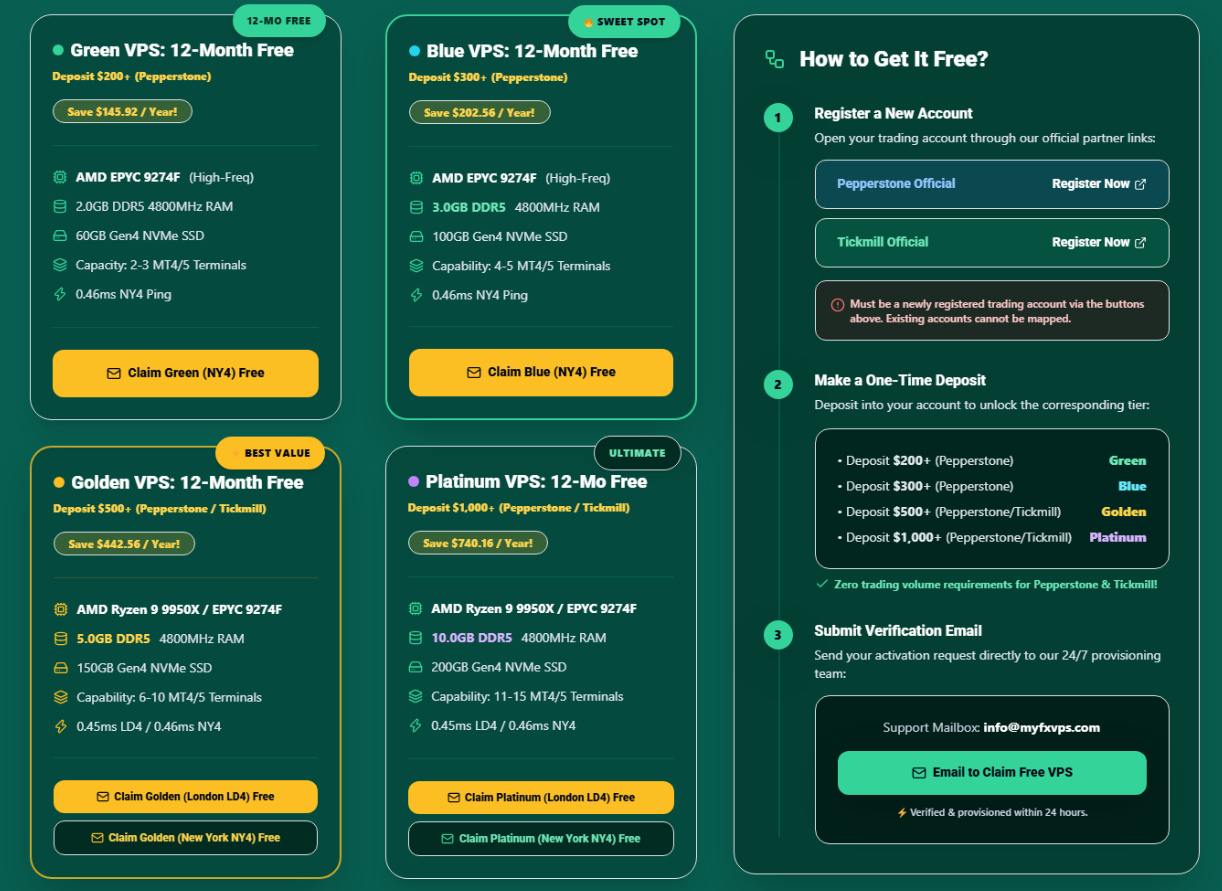
At MyFXVPS, we have engineered a zero-queueing standard to entirely eradicate CPU Ready Time and Co-Stop latency. We guarantee strict 1:1 physical core mapping, deploying our clients onto entirely dedicated hardware threads powered by flagship AMD Ryzen 9 9950X (5.7GHz single-thread boost) and elite AMD EPYC processors.
When the New York session opens and global tick volume explodes, your EAs are granted absolute, immediate, and uninterrupted raw hardware processing at the exact millisecond the data arrives. Stop waiting in line for processing power.
Get a premium, zero-overbooked VPS 100% FREE indefinitely by connecting your Pepperstone or Tickmill trading account!
🎁 Claim Your 100% Free Premium VPS Now